When to Use AI "Thinking" Models

Executive Summary
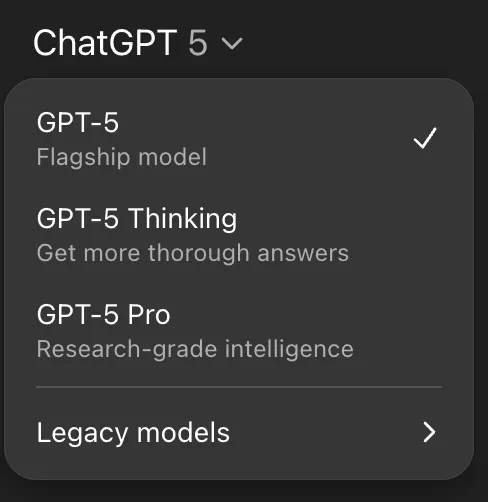
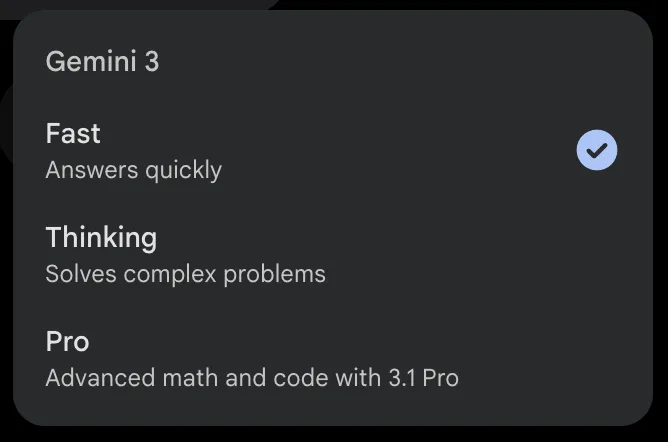
Most AI platforms offer multiple model options that trade off speed, reasoning depth, and cost. In general:
- Use a Fast / Instant (general-purpose) model for everyday writing, editing, summaries, and straightforward analysis.
- Use a Thinking (reasoning) model when the task requires careful logic, planning, multi-step problem solving, or structured decision support.
- Use a Pro (highest-depth) model only for rare, high-stakes or unusually complex work—because it tends to be slower, and is either more expensive or has tighter usage limits depending on your platform.
Thinking Toggle
A common source of confusion is automatic reasoning: some platforms decide when to “think” more deeply without telling you clearly, which can increase response time and cost. When your platform allows it, switch reasoning on/off (or low/medium/high) manually so you can control latency and spend.
What each model type is
How to Choose
- Default to efficiency: Use the most efficient model you believe is up to the task. Start with a Fast / Instant model and move up only if needed.
- Speed vs. budget: More reasoning → more tokens → higher cost and latency. If you have a lower budget, need to work at a high scale, or at high speed, Fast / Instant is likely sufficient. For particularly high scale projects, we recommend requesting access to the API.
- Strategic prompting: When using Thinking or Pro, get the most out of your use by planning your prompts and being clear about the kind of outputs you’re looking for. For more information on how to talk to AI, see our articles on beginner and advanced prompt engineering.
Columbia-Aligned Use Cases
- Simple lesson materials (Fast / Instant): Generate reading guides, create rubrics, and produce accessibility rewrites (plain language, alt text starters)
- Advanced lesson materials & pedagogical design (Thinking): Draft lecture notes, sequence modules, and seek input on assignment design
- Edge cases for Pro: Reserve Pro for rare, high-stakes work that require the strongest reasoning such as synthesizing very long or technically dense source materials, or building master course templates
- Literature triage & drafting (Fast / Instant): Create abstracts, related-work skims, figure captions, and code comments
- Methods & argument mapping (Thinking): Contrast methods across papers, extract assumptions/limitations, outline replication plans, and draft analysis plans with alternatives and risks
- Edge cases for Pro: Consider Pro for the most difficult prompts like long, complex inputs or reasoning deeply across multiple sources where precision and consistency matter most
- Everyday comms & docs (Fast / Instant): Draft clear and consistent emails, memos, other communications
- Scenario planning (Thinking): Generate criteria-sensitive option analyses, budget rationales, process redesigns, or policy comparisons
- Edge cases for Pro: Rarely needed—but can be valuable for the most demanding strategic documents that require a deep synthesis of lengthy reports, complex financial narratives, or multi-stakeholder inputs
Responsible Use Guidelines
- Data sensitivity: Ensure all data usage aligns with Columbia University’s AI Data Classification Table and Policy. Do not use personal/non-UNI LLM accounts for such data. For more see our article on AI data privacy.
- Attribution & integrity: Disclose AI assistance and cite sources as appropriate to your work
- Bias & fairness: Keep a human in the loop for outputs that affect people (teaching, hiring, grading)
- IRB & compliance: Consult IRB early for studies involving generative AI
- Accessibility: Ensure generated materials meet accessibility standards
Visit the Office of the Provost’s Generative AI Policy for further information
Get Started
See our AI Services page to get started with an LLM platform like ChatGPT or Gemini.
AI Consultation
We provide consultations to understand your needs and ensure our AI services align with your requirements. To discuss how our AI services can support your specific use cases and workflows, please request a consultation at [email protected]